AsterVale Cloud sends back the Cloud Services Agreement on a Tuesday morning. The attachment is called final_v7_AV.docx. Track Changes shows five edits: a new contact title, a lower uptime figure, faster payment, a longer term and email as a way to serve notices.
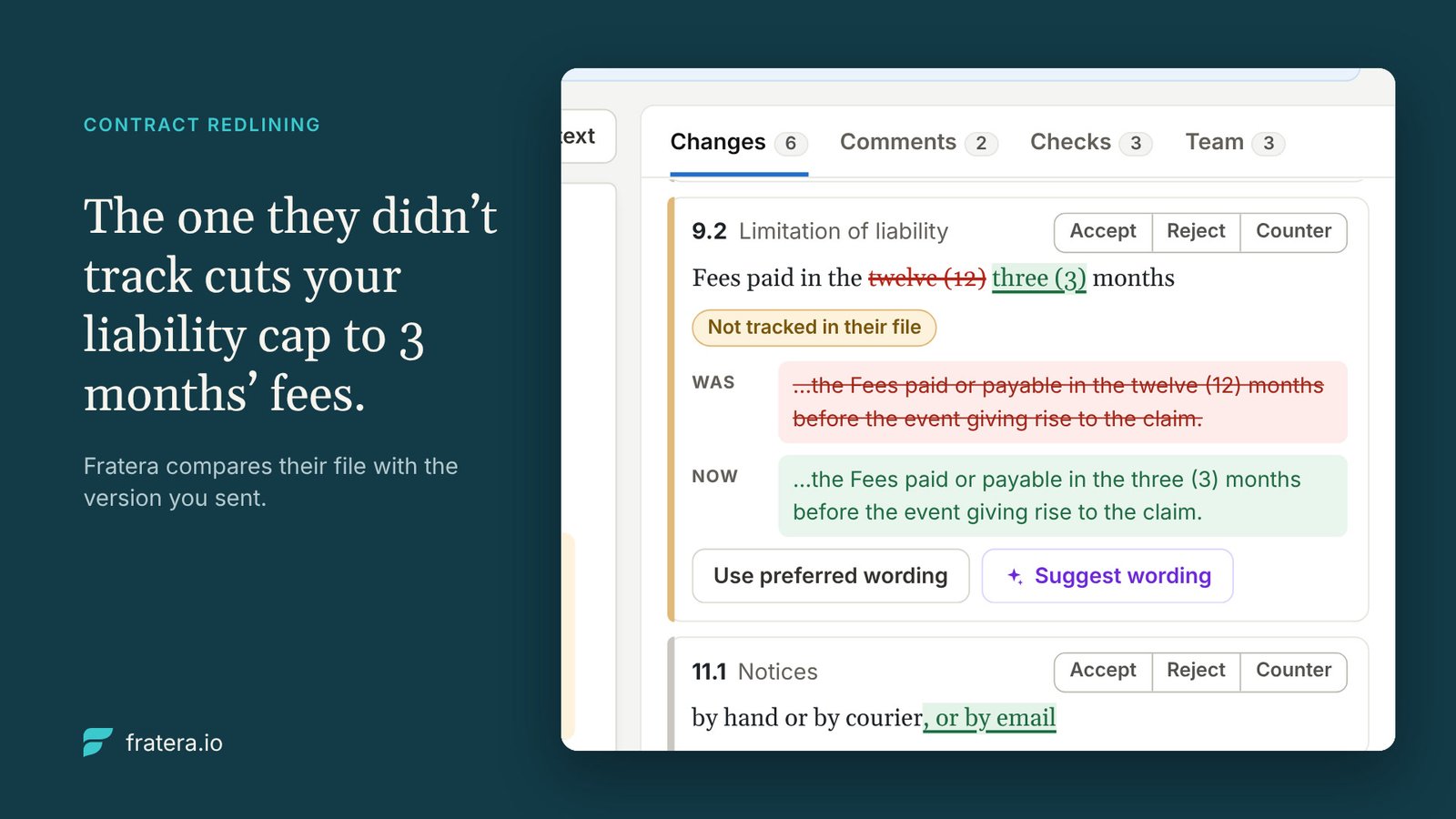
Clause 9.2 shows nothing. In the version you sent, liability was capped at twelve months’ fees. In theirs, the cap is three months’ fees. Nobody marked it. On an agreement worth €480,000 a year, that turns a €480,000 cap into a €120,000 one.
If your review starts and ends with their tracked changes, that one goes through. You find out the day you need the cap.
Compare with what you sent, not with what they marked
Fratera does not rely on their markup. When the counterparty’s file comes back, Fratera compares it with the version you sent and puts every difference on one list. A change they did not track carries a chip that says so: Not tracked in their file.
In the AsterVale example, the list shows six changes, five tracked and one not. The round opens as Round 2 · AsterVale Cloud’s review of v2 · 0 of 6 decided, and the liability cap sits on the list with the others instead of hiding in the text.
Decide each change on its own
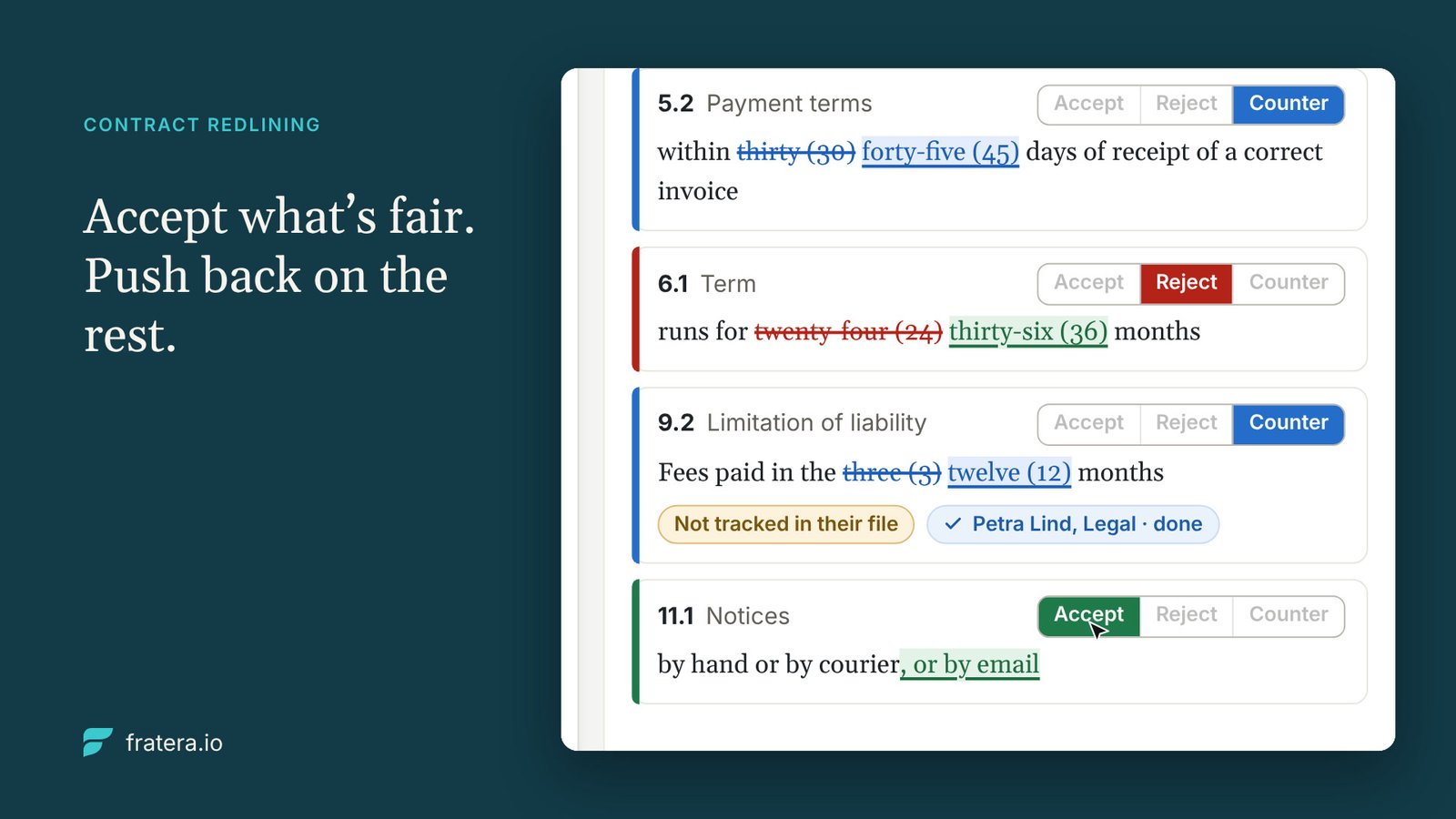
Every change gets its own decision: Accept, Reject or Counter. The new contact title is fine, so you accept it. The lower uptime and the longer term are not, so you reject them. The cap gets a counter. Nothing is accepted by default, and the round shows how many changes are still open.
You don’t draft the counter from memory. Use preferred wording brings in your own clause from the clause library, so the cap goes back to twelve months in the words your legal team has already approved.
Where your library has no ready answer, AI suggests wording based on it, labelled Suggested by AI. Take it or dismiss it. In the example, AsterVale wants invoices paid in 30 days instead of 60; the suggestion counters with 45 days from receipt of a correct invoice, and you take it.
Your edits go into the document in the browser, on the Word page layout, with tracked changes always on. Every edit you make is recorded as your tracked change.
Give legal clause 9, not the whole contract
Invite reviewers and approvers from your team and give each the clauses they own. Petra in legal gets clause 9. Marek in finance gets clause 5. Each works on their own clauses, and you see their status without chasing anyone. Legal spends its time on the clause that carries the risk, not on forty pages of boilerplate.
Comments sit on the exact passage. Shared comments travel to and from the Word file, so AsterVale sees them. Internal comments stay in Fratera, so your team can argue about the cap without the supplier reading along.
Check the draft against your own standards
The change list covers what moved between versions. The checks cover what was in the draft all along, which matters most in round one, when the first draft is on their paper.
The library check compares the agreement with your clause library and marks each clause Matches, Differs or Missing, with Show in text to jump to the passage. The AI check reads the whole document against your library and suggests edits toward your preferred wording.
Send the next round in the format they use
When the round shows 6 of 6 decided, Seal round and send. The next version goes back as a Word file, clean or with your changes tracked. You can also download a clean copy in Word or PDF.
Fratera keeps the rounds in order: your v1, their v1.1, your v2, their v2.1, your v3. Nobody has to work out which final_v7 is the final one.
From first draft to signature in one place
A redline can start before the contract has a number. Once the terms are agreed, send the agreement for approval and e-signature from the same place, so the people who approved it and the signed copy sit with the contract rather than in an inbox.
Watch the round in 50 seconds
Their file arrives, the untracked change surfaces, six decisions get made and v3 goes out.
Read the video transcript
Their redline is back: an inbox full of final_v7 attachments.
They tracked five changes. They made six. Fratera opens round 2 and lists every change in AsterVale Cloud’s file.
The one they didn’t track cuts your liability cap to 3 months’ fees. Fratera compares their file with the version you sent.
Put your wording back: the preferred wording from the clause library restores the cap to twelve months.
Legal reviews clause 9. Not the whole contract.
Accept what’s fair. Push back on the rest. Two changes accepted, two rejected, and the payment terms countered with wording suggested by AI. 6 of 6 decided.
They get a Word file. You keep every round. Seal round and send: v3 goes to AsterVale Cloud with your changes tracked.
Then approval and e-signature, in the same place. Approved by the finance director, signed by both parties, sealed PDF added to the contract.
See every change. Decide each one. Fratera Sourcing, early access. Talk to us about early access at fratera.io/#contact.
Fratera Sourcing · early access