What Fratera does, module by module.
The sections follow the route from demand to signature, then the life of the contract, and each names the edition that includes it. Core covers your contracts and suppliers, Pro SRM adds supplier management, workflows and purchasing, and Sourcing adds e-sourcing and redlining.
E-sourcing · Included in Sourcing
Run the RFP with your whole team.
Run an RFI, RFQ or RFP with your existing suppliers and new prospects, built from ready-made question packs or straight from Excel. Each section goes to the colleagues who know it, and a heatmap puts every supplier against every section before you award.
- Suppliers answer through a link and a one-time code, on screen or in Excel, with no account to create
- Bidders’ questions are answered once and published to every bidder, anonymised
- Score and compliance heatmaps show every supplier against every section, and who fails a must-be-met question
- Your experts score their own sections. Their scores combine, and the moderator settles any disagreement with a reason
- Award the whole tender or lot by lot, with a letter to every bidder and an optional debrief
- The winning prices and dates go straight into the contract, then to redlining against your clause library and e-signature
Redlining · Included in Sourcing
Make legal part of the team.
When the counterparty sends their file back, Fratera compares it with the version you sent and lists every change, including the ones they did not track. You decide each change on its own: accept, reject or counter.
- Edit in the browser on the Word page layout, with tracked changes always on
- Invite reviewers and approvers from your team, and give each the clauses they own
- Comments on the exact passage: shared ones travel to and from the Word file, internal ones stay in Fratera
- An AI check of the whole document against your clause library, with suggested edits toward your preferred wording
- Send the next version clean or with your changes tracked, or download a clean copy in Word or PDF
- Start before the contract has a number, then send it for approval and e-signature
Workflows and assessments · Included in Pro SRM
Build your own workflows and assessments.
Combine forms, branches, approvals, e-signature, notifications, document storage, record updates and outcomes in the order your process needs. AI drafts answers from earlier steps and the record’s documents; a person accepts anything that changes a record, an approval or a signature.
Draft with AI turns a plain-language description into a first workflow.
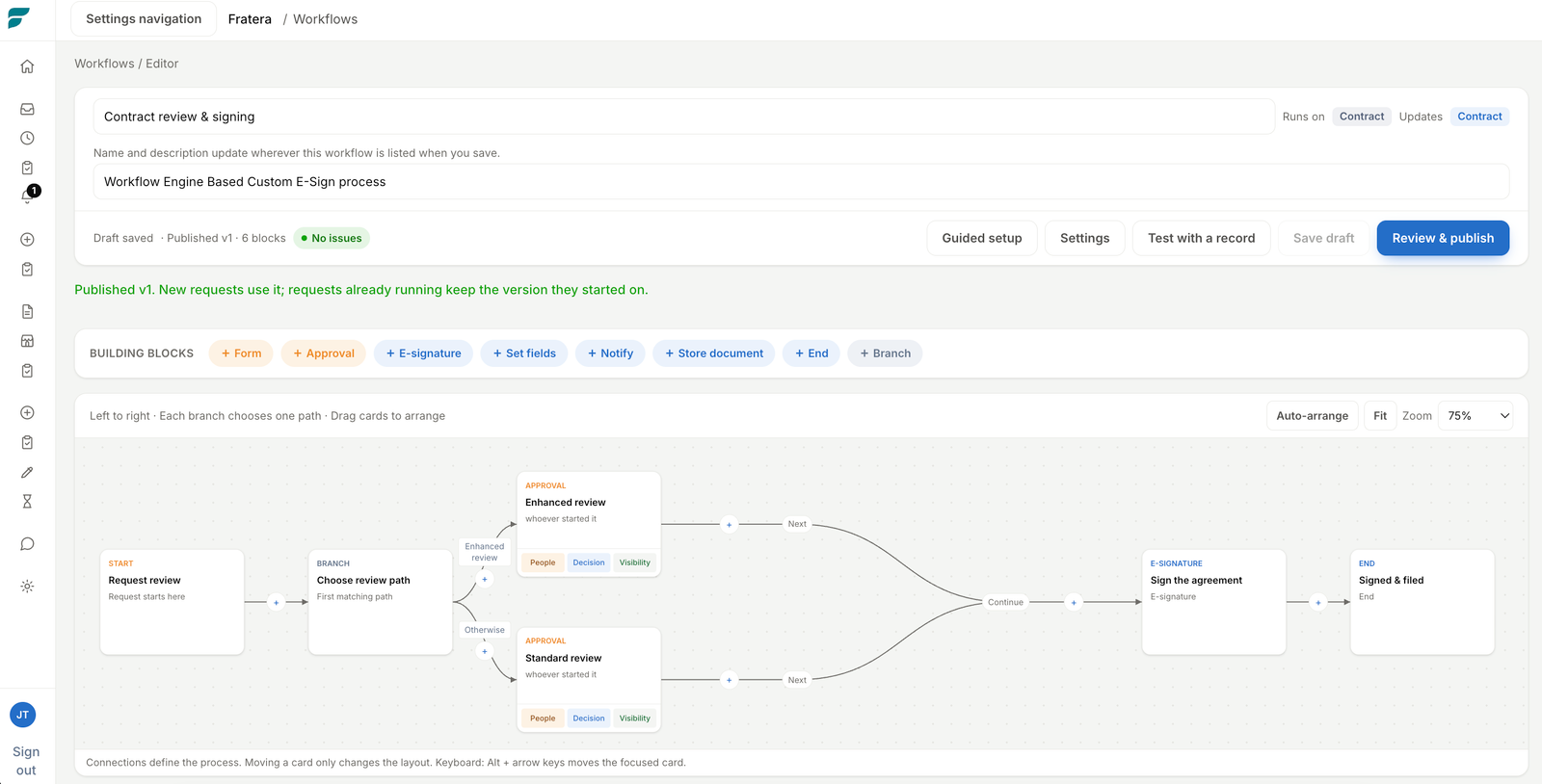
- Forms and assessments that collect what the next decision needs
- Standard or enhanced review, chosen by rules you can read
- Steps assigned to people, work groups, record owners or external respondents
- Due dates, reminders, escalation, return and reassignment
- After approval: e-signature, notifications, document storage or record updates
- Test on a real record, then publish a fixed version; runs already started keep theirs
E-signing · Included in Core
Move from approval to signature without another subscription.
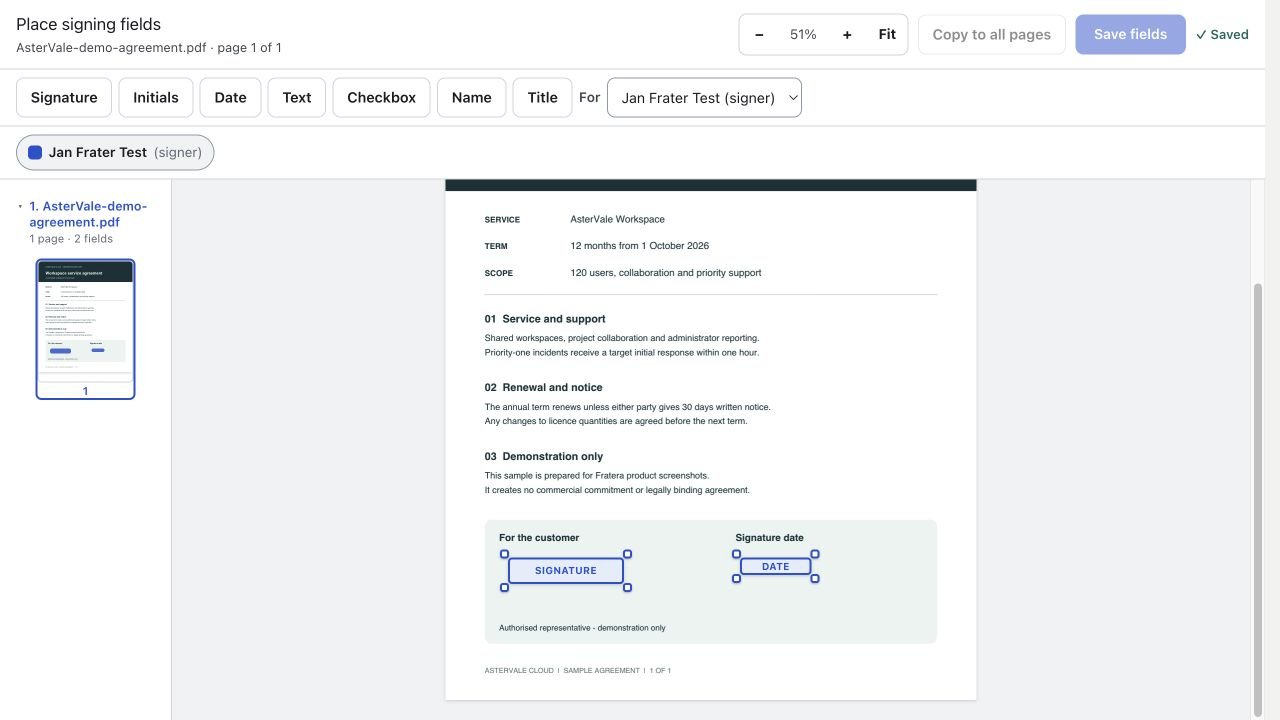
Prepare fields, send for signature and return the completed document to the contract record without moving the process into a separate tool.
- Send-sign-archive in one place
- No separate e-signature subscription or per-envelope fee
- Embedded field placement
Purchasing · Included in Pro SRM
Carry the approval through to the purchase order.
Raise the order from the signed contract. Fratera shows how much is already ordered against it and flags an order that would go over the contract.
A colleague raises a purchase request. Your own approval rules decide who signs it off, and the approved request becomes a numbered purchase order. An order can also ride along with a new contract, so both are approved together.
Purchase requests
Anyone can raise a request from an “I need something” form. Procurement sees every request and every order on one Purchasing page.
Approved by your own rules
Requests follow the amount bands of your delegation of authority. An approver can be one person or a group where any member can decide.
Purchase orders in your own design
Each of your companies gets its own order layout with logo, numbering and terms. Send the order to the supplier straight from Fratera.
Or let your ERP issue it
In ERP mode, your ERP picks up approved requests through the Fratera API, issues the order and writes its PO number back.
Contracts · Included in Core
Manage the record, not just the PDF.
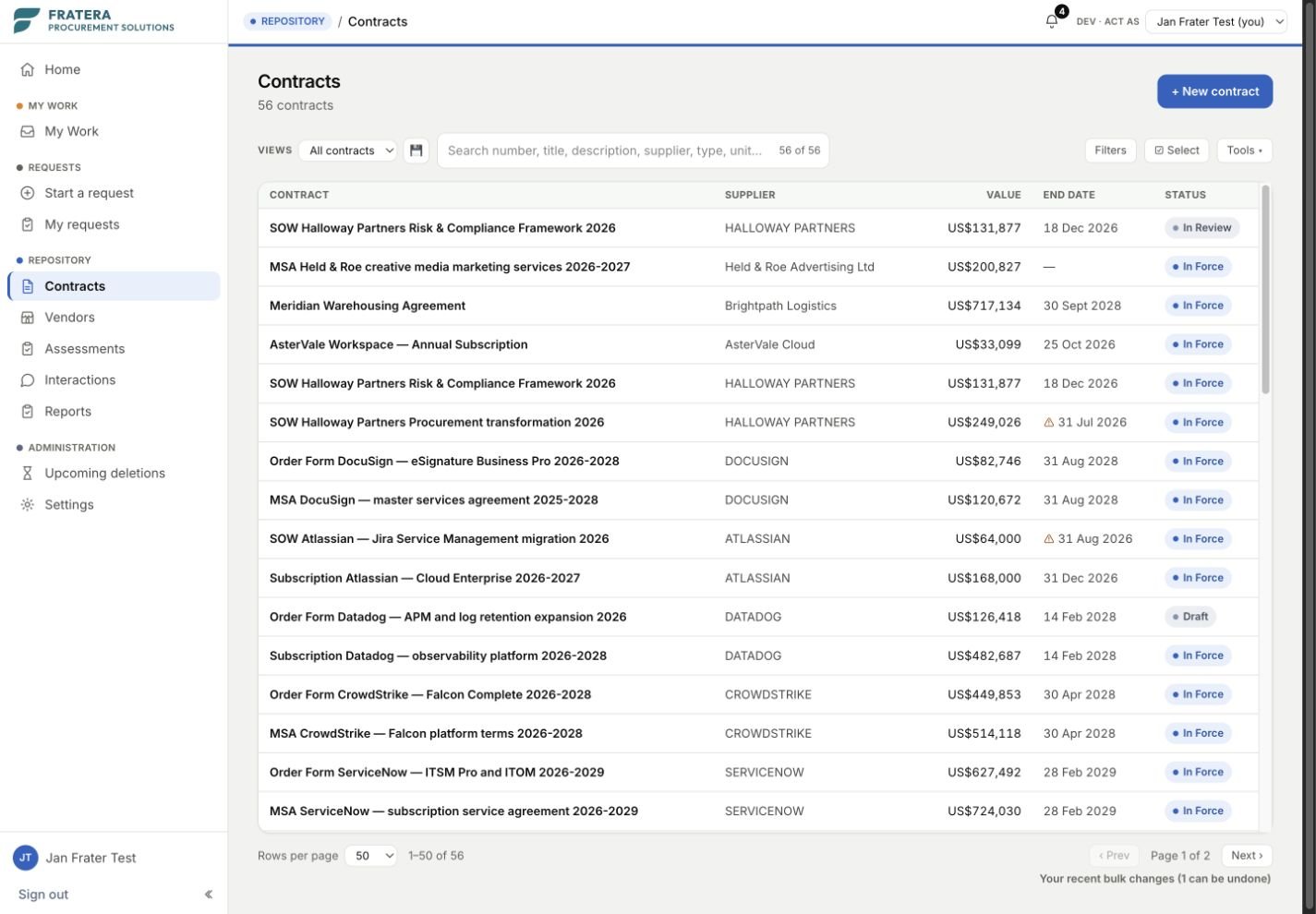
Fratera turns contracts into structured procurement data. Agreements, amendments and orders stay linked, and fields, classifications and reports stay consistent across the portfolio.
- Document storage and version history
- Structured parties, dates, values and obligations
- MSA-amendment-order relationships
- Custom fields per business line
- In-line editing and bulk changes
- Bulk import · table export
- Curated, extensible classifications and more than 150 currencies
Data collection · Included in Core
Ask colleagues for the contract data you are missing.
Procurement rarely knows every missing field across an inherited contract portfolio. Select the contracts and fields that need attention, assign each record to the right colleague, and let Fratera bring the answers back into one review sheet.
Responses are attributed, compared with the current value and staged for review. Nothing changes in the contract record until an authorised person applies it.
- 01SelectChoose records and missing fields.
- 02AssignSend each record to the right colleague.
- 03RespondThe request waits on the recipient’s Home page.
- 04ReviewCompare every response with the live value.
- 05ApplyAccept only the changes you approve.
Renewals and Home · Included in Core
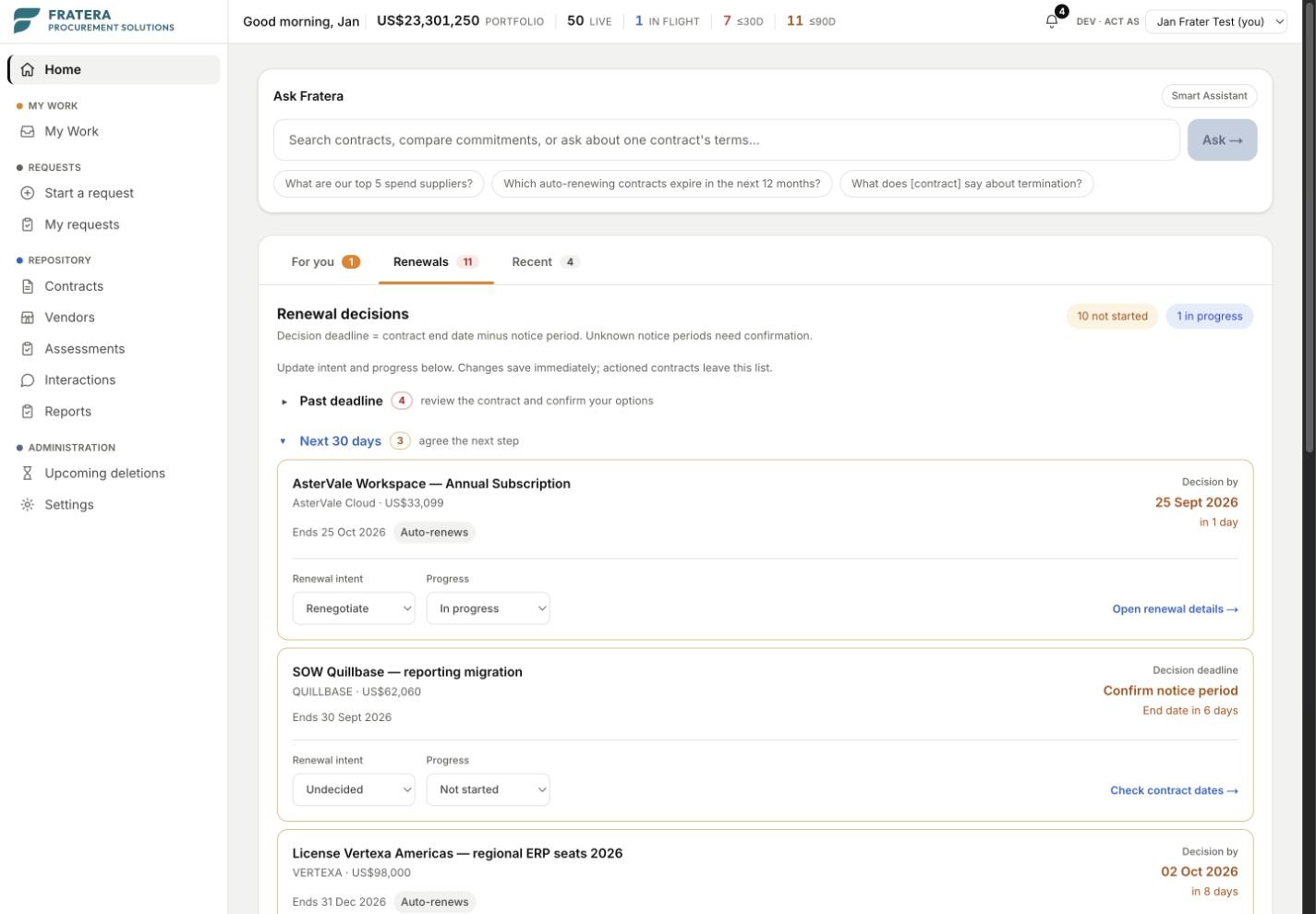
See every notice deadline before it passes.
Fratera tracks the notice deadline, not only the renewal date. Owners see upcoming decisions on their Home page, next to the approvals, signatures and returned requests waiting for them.
On Pro SRM, the Renewal review workflow can start by itself a set number of days before the notice deadline and lands with the contract owner. A Termination workflow records the reason, the planned end date and the notice you gave.
- Auto-renewal flag tracking
- Notice deadlines calculated from contract terms
- Renewal decisions report with every notice deadline ahead
- Stakeholder notifications
- Home: approvals, signatures and returned requests waiting for you, in one list
- Outcome notifications when a request, approval or signature completes
- Personal activity log
- Reminder schedules you set yourself
Vendor 360 · Included in Pro SRM
Everything you have with a supplier, on one page.
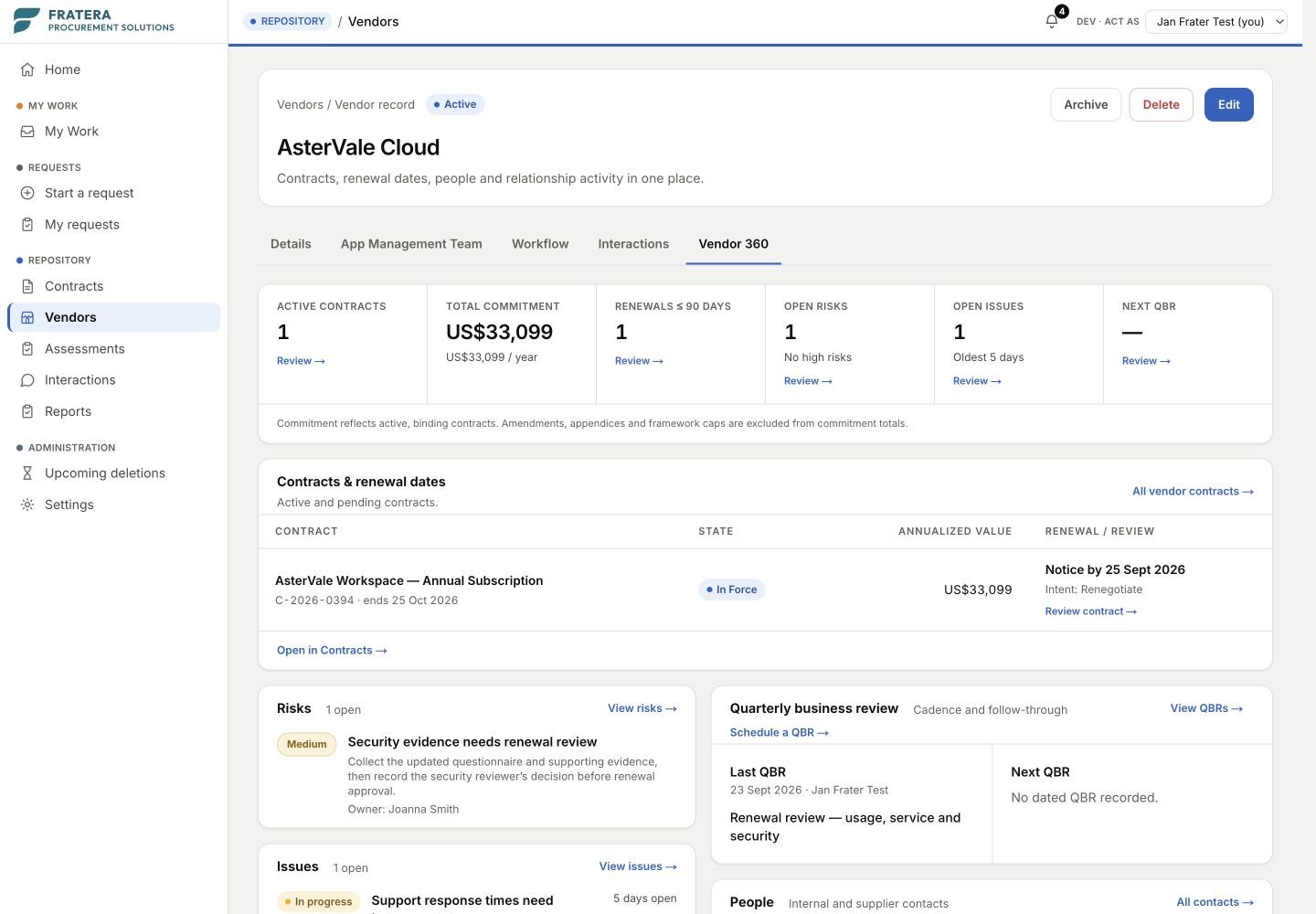
Fratera brings commitments, agreement families, renewals, risks, reviews and open actions into one supplier view.
- Total commitment roll-up across all agreements
- A commitment total that never counts an amendment or a framework cap twice
- Master agreements, amendments and orders kept together
- Supplier survey scores from your colleagues
- Every QBR, risk and interaction logged against the vendor
- Supplier documents such as certificates and insurance, each with its expiry date
Supplier relationship management · Included in Pro SRM
Log reviews, risks and calls against the supplier.
The review decision, unresolved risk and promise made on a call should not disappear into somebody’s inbox. Record each one against the vendor with an owner and status, then see it in Vendor 360.
Interactions log
Log calls, escalations, commitments and complaints as they happen, each with an owner, a criticality and an open or resolved state. Filter to your own, or to everything still open.
Risk tracker
Raise a risk against a vendor or a contract, rate it, assign the mitigation, close it. The register shows what is still open and how long it has been open.
QBR tracker
The quarterly business review as a record rather than a deck: what was discussed, what was agreed, who owns the follow-up, and whether it happened.
Supplier surveys
Ask the colleagues who work with a supplier how it is going. Answers stay anonymous, and results only show once enough people have replied. The score and its trend appear on Vendor 360.
Obligations
Track what each side owes under a contract, one-off or repeating, with an owner and a reminder before the due date. Milestones sit in the same list.
Supplier assessments
Run onboarding and risk checks as a workflow. The supplier answers through its own link, your specialists review, and the result shows on the vendor with the date it stays valid until.
AI assistant · Included in Core
Answers about your contracts, with the page they came from.
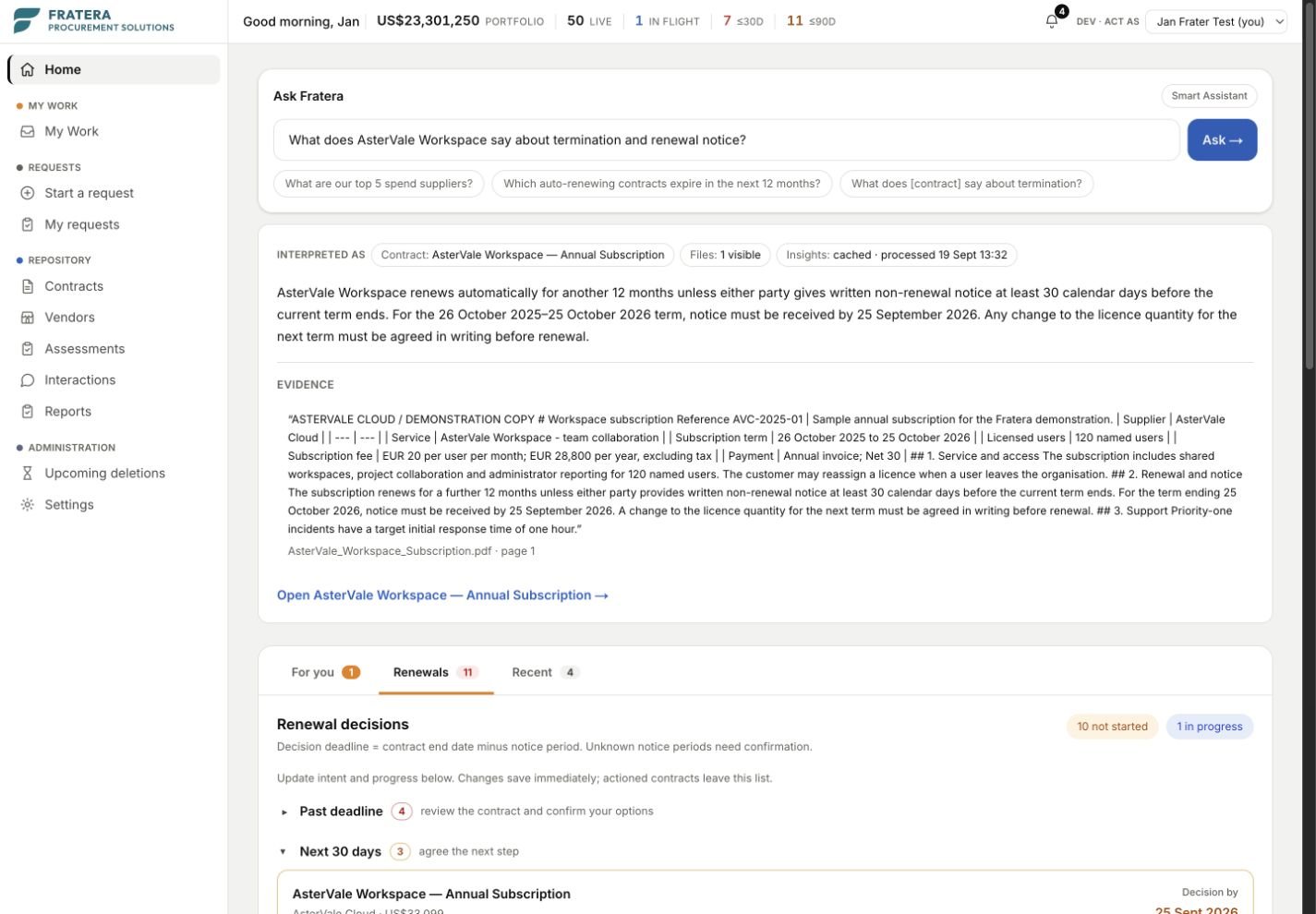
An answer about one contract cites its page. A question across the portfolio is answered by a read-only query, so the AI never does the arithmetic.
- New contracts read into fields, for a person to confirm
- Ask questions across your whole portfolio
- Document answers cite the page they came from, so you can check them
- An agreement recap on every document the AI reads
- AI never approves, calculates money or changes a record on its own
Clause library · Core and Pro SRM
Know what every contract says about the terms you care about.
Your clause library is the list of terms your team looks for. When the AI reads a contract, it finds each one and shows you where it is written.
Included in Core
Find your terms in every contract
- Headings you define, each with what to look for
- Each heading applied to the categories and contract types you choose
- Every clause the AI finds, with the exact quote and its page
- A quote that is not on the cited page is never shown
Included in Pro SRM
Compare them with your own wording
- Your preferred wording for each heading
- Each contract’s terms marked Matches Differs or Missing
- Reports › Contract terms lists many contracts against the headings you choose
- Ask the assistant which contracts’ terms differ from yours
- Run the same check over the contracts you already have, in the background
Connect your ERP and BI tools.
An open API on every edition. Your systems read contracts, suppliers and key dates and follow a feed of changes. With Pro SRM purchasing, your ERP also picks up approved requests and writes its order number back.
Security · Included in every edition
Your own database, single sign-on and an audit trail, from Core up.
Core gets the same security as Sourcing, without an enterprise contract.
Your own database
Every customer gets their own isolated PostgreSQL database in the region they choose, not a shared table with a tenant column. Row-level security inside it, encrypted at rest and in transit.
SSO, and SSO-only when you want it
Email login or Entra / OIDC single sign-on, with self-service enforcement of SSO-only access when your organisation is ready.
Recoverable deletion and an audit trail
A deleted record stays recoverable for 30 days before it is purged, and an administrator can keep it longer, up to a year. The audit trail says what went and when. Roles and access rights are yours to shape.